
Automation has always been Zapier’s strength. With the launch of Copilot, Zapier is moving deeper into AI by letting anyone build intelligent agents using natural language. Instead of manually wiring triggers and actions, you can simply describe what you want, and Copilot translates that into a functioning workflow.
For businesses, this means less time spent on repetitive setup and more focus on outcomes.
So.. what is Zapier ?
Zapier is one of the most widely used no‑code automation platforms, designed to connect thousands of apps and services without requiring programming knowledge. No‑code tools like Zapier have surged in popularity because they empower anyone like marketers, recruiters, entrepreneurs, or small business owners, to automate repetitive tasks and build workflows quickly. Instead of writing scripts or hiring developers, users can simply drag, drop, or describe what they want, and the tool handles the rest.
This blog highlights how Zapier Copilot streamlines recruitment by transforming plain‑English instructions into automated workflows.
Recruitment Assistant in Action
To illustrate how Zapier Copilot can be applied in practice, I set up a recruitment workflow scenario. The objective was to streamline the hiring process by reducing manual steps and keeping recruiters and candidates engaged through familiar tools like Gmail, Zoom, and Jotform.
I felt this use case interesting because recruitment often involves a lot of repetitive, manual coordination between recruiters and candidates. Tasks like sending notifications, scheduling interviews, reminding recruiters for feedback, and updating candidate status are necessary but time‑consuming. Without automation, recruiters spend valuable hours managing inboxes, juggling calendars, and ensuring candidates are kept informed.
This recruitment assistant agent built with Zapier Copilot directly addresses these pain points by:
- Reducing manual email handling: Recruiters don’t need to draft or forward routine notifications; the agent automates them.
- Streamlining scheduling: Instead of manually creating Zoom links and calendar events, the agent handles it
- Ensuring timely communication: Candidates receive prompt updates (confirmation, rejection, or next steps) without waiting for recruiters to craft individual responses.
- Improving accountability: Automated reminders ensure recruiters provide feedback, preventing candidates from being left in limbo.
- Maintaining data consistency: Candidate details and interview outcomes are updated in the backend, with Google Sheets serving as the data store.
To build this workflow, here is the use case I described in plain English to Zapier Copilot.
“When a candidate submits the Recruitment Application Form via Jotform, capture their name, email, and role applied. Record these details in Google Sheets along with application status and interview scheduling information. Notify the recruiter (abc@gmail.com) by Gmail and allow them to reply with either ‘Schedule Interview’ or ‘Reject.’
If they reply ‘Schedule Interview,’ automatically create a Zoom meeting, schedule it three days after the application at 10:30 AM with “abc” as the interviewer, and send the candidate a confirmation email.
If they reply ‘Reject,’ update the status in Google Sheets and send a polite rejection email.
After the interview, remind the recruiter to provide feedback after two days. Based on their response, send the candidate the appropriate outcome email: ‘Advance’ for next steps, ‘Reject’ for a rejection, or ‘Pending’ for a holding message.
Ensure all candidate data is tracked in Google Sheets and that professional email communication is maintained at each stage.”
Workflow
The diagram below is a visual representation to illustrate how Zapier automated the recruitment workflow with the instructions I provided in Copilot.
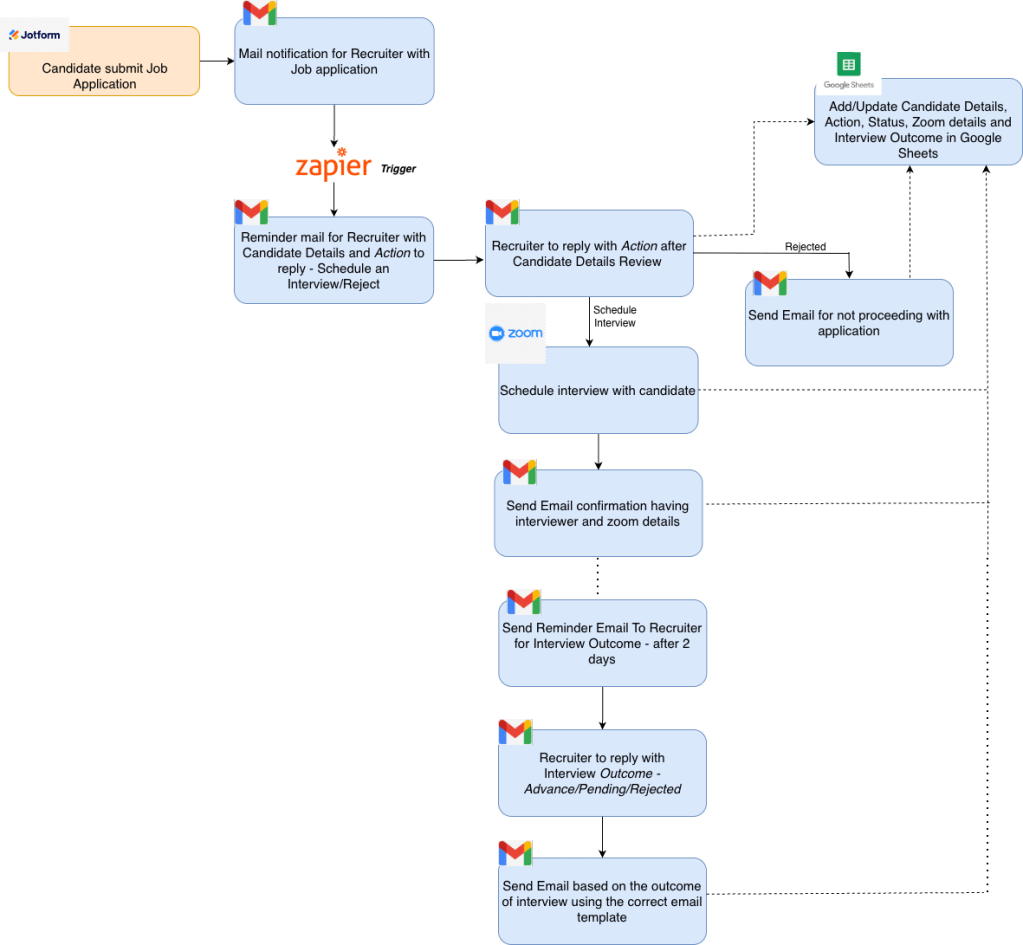
Let’s walk through the steps shown in the diagram.
- Agent listens for new Jotform submissions in the recruiter Gmail account.
- Once received, the agent sends Gmail notifications to recruiters requesting for an action – Schedule Interview/Reject
- Recruiter after reviewing the candidate details,resumes, cover letter etc, replies with the action
- Agent parses the recruiter replies to determine actions
- If the action is “Schedule Interview“, agent creates Zoom meetings and calendar events, else, if the action is “Reject”, agent sends a Rejection notification email to the candidate.
- For “Schedule Interview” action, Zoom details are sent to the candidate over email.
- After 2 days of interview (represented by dotted line in the diagram), agent sends a reminder Gmail notification to the recruiter asking for the interview outcome, which can be any one of – Advance/Pending/Rejected
- Sends Gmail notification to candidates based on interview outcomes
- Updates every step of the process in the backend, which is Google Sheets in this case.
As you can see from above, apart from the required human input to send the action and outcome, every other step is automated.
The following screenshots highlight how the agent handles email automation throughout the recruitment process.
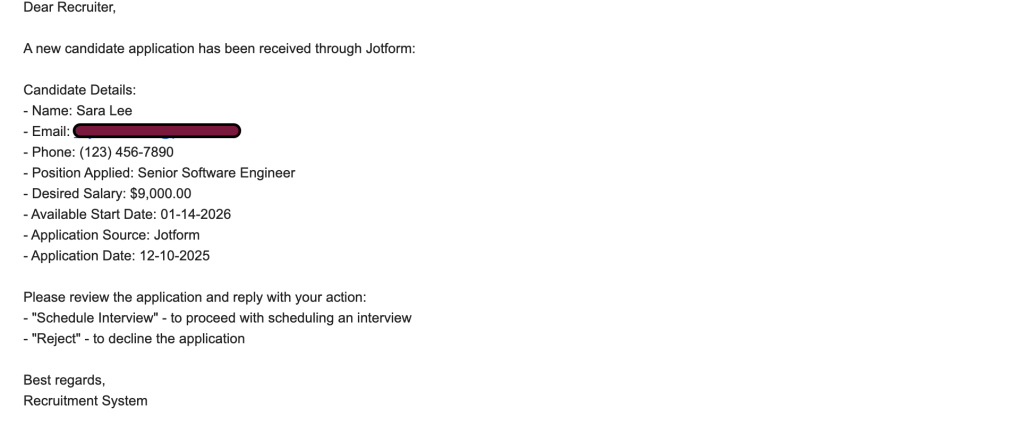
- Candidate submits the jotform received in the recruiter inbox. This is a reminder email to Schedule the interview or Reject the application after reviewing the candidate’s resume/cover letter, which are received from the Jotform
2. Once the recruiter replies with “Schedule Interview“, agent sends the below email with the Zoom link automatically created to the candidate email address.

3. Once the interview is over, a reminder email is sent to the recruiter after couple of days, asking for the outcome of interview – which can be Advance/Rejected/Pending
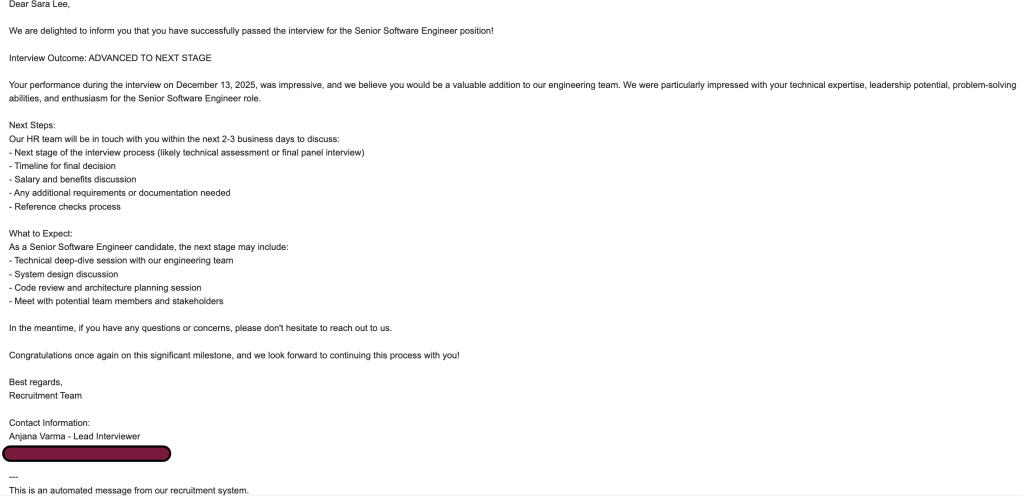
4. Based on the outcome sent above, an email is sent to the candidate to notify of the outcome
For eg: Below is the email sent to candidate for Advance outcome
Below is for Pending outcome
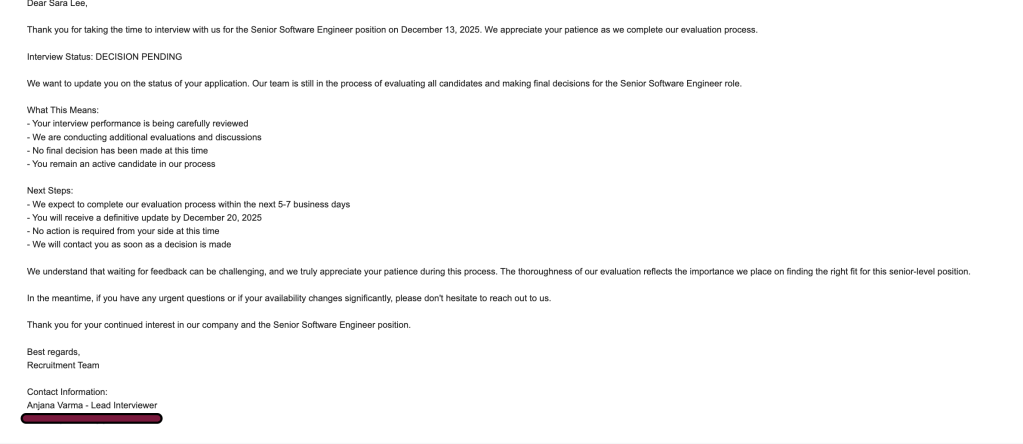
Below is for Rejected outcome

5. Every status and outcome is recorded in Google Sheets, as shown below. This ensures all details are automatically tracked without omissions.

Voilà – the entire workflow is now in place, seamlessly automated from start to finish.
From candidate application to final outcome, every step is now connected and handled automatically.
Conclusion
By leveraging Zapier’s integration ecosystem with Copilot’s AI‑driven automation, we’ve built a workflow that takes the complexity out of hiring. Candidate details flow straight into Google Sheets, recruiters are notified instantly, interviews are scheduled seamlessly with Zoom, and professional emails keep everyone informed at every stage.
No more juggling spreadsheets, inboxes, and calendars – everything is connected, tracked, and handled automatically. Recruiters stay organized, candidates feel supported, and interviewers are reminded to share outcomes without missing a beat.
The real magic is how simple it all is: you describe the process in plain English, and Copilot with Zapier turns it into a working recruitment assistant agent. It’s automation without the headaches – just smart workflows that make hiring smoother, faster, and more professional.


Leave a Reply